Smart TVs Are Watching What You Watch: What ACR Is and What You Can Actually Do About It
TV manufacturers have stopped being subtle about it: many now openly sell hardware at a loss specifically to build an installed base they can monetize through advertising, powered largely by a technology called Automatic Content Recognition (ACR). The uncomfortable part isn't just that it exists — it's that most of the traffic your smart TV sends is encrypted, meaning even a technically savvy person can't fully verify what's being collected or confirm that turning a setting off actually stops it. Here's what ACR actually is, and a realistic look at what does and doesn't work to limit it.

Quick Comparison
Mitigation Method | Effectiveness | Verifiable? | Effort Required | ||
|---|---|---|---|---|---|
Turn Off ACR in Settings | ⚠️ Partial | ❌ No, traffic is encrypted | ✅ Low | ||
Direct HDMI Boot ("Dumb TV" Mode) | ✅ Good, if supported | ⚠️ Only if ACR is also off | ✅ Low | ||
Pi-hole / DNS Filtering | ❌ Largely ineffective now | ❌ No | ⚠️ Medium | ||
IP Address Blocking | ❌ Not practical | ❌ No | ❌ High, error-prone | ||
Never Connect to Internet | ✅ Fully guaranteed | ✅ Yes | ❌ High (loses smart features) |
1. What Is ACR (Automatic Content Recognition)?
Effectiveness: N/A — This Is the Problem, Not a Solution
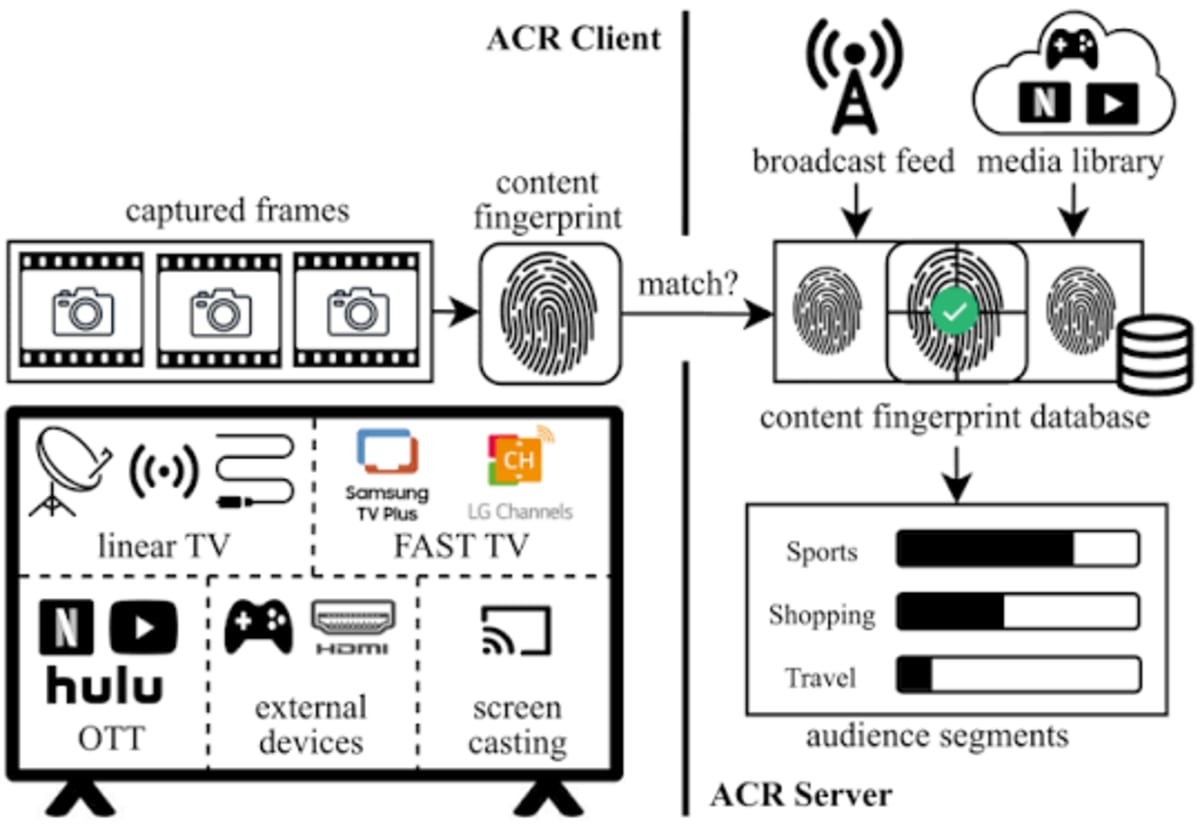
ACR works by repeatedly sampling whatever your TV is displaying or playing — screenshots and audio samples taken multiple times per second — regardless of the source, whether that's a streaming app, an HDMI input from a game console or PC, or even a USB drive of personal photos.
Key Points:
- Samples are converted into digital fingerprints and checked against a large content database to identify exactly what's on screen
- The same underlying fingerprinting concept dates back to Shazam's original song-identification technology from 2002
- ACR applies to any input source, not just the TV's own built-in streaming apps — including HDMI feeds from your own devices
- Manufacturers often label this feature euphemistically (e.g., "smart interactivity" or "Live Plus") rather than describing it plainly
Why It Matters: Because ACR monitors every input, not just built-in apps, connecting your own streaming box, PC, or console to a smart TV doesn't protect you from it — the TV can still see and fingerprint whatever crosses the screen.
2. Turning Off ACR in Settings
Effectiveness: Partial, and Not Verifiable
Every major TV brand offers some way to disable ACR, but because the resulting network traffic is encrypted, there's no reliable way for an outside party to confirm that disabling the setting actually stops all data collection.
Key Points:
- The setting is often buried and labeled with brand-specific, non-obvious names rather than "ACR" directly
- Even after disabling it, verifying that data collection has actually stopped isn't possible without breaking the TV's encryption, which most models don't allow via custom SSL certificates
- There's a real possibility that settings like this get silently re-enabled after firmware updates, similar to patterns seen with other privacy-related toggles on other platforms
Why It Matters: Turning ACR off is worth doing and better than leaving it on, but treat it as a best-effort mitigation rather than a guaranteed fix — you're trusting the manufacturer's word with no way to independently verify compliance.

3. "Dumb TV" Mode via Direct HDMI Boot
Effectiveness: Good, When Supported
Some TVs let you skip the smart home screen entirely and boot directly to a specific HDMI input, effectively turning the smart TV into a dumb display for whatever external device you plug in.
Key Points:
- Bypasses the smart TV interface entirely on startup, going straight to your chosen input
- Pairing this with a separate, trusted streaming device (or a Linux-powered PC) shifts your actual app usage away from the TV's own OS
- Not universally supported — availability of this feature varies significantly by brand and model
- Does not guarantee the TV isn't still capable of sampling the HDMI feed itself if ACR remains active in the background
Why It Matters: This is one of the more practical middle-ground options — it doesn't require replacing your TV, but its effectiveness still depends on whether ACR is also fully disabled, since ACR is explicitly designed to monitor HDMI inputs too.

4. Pi-hole or DNS-Based Filtering
Effectiveness: Largely Ineffective Today
This used to be a viable technique for blocking unwanted phone-home traffic, but several modern factors have made it far less effective against smart TVs specifically.
Key Points:
- Most TVs tested didn't allow manual network configuration, relying entirely on router-provided DHCP settings
- Even when a custom DNS server is specified via DHCP, TVs frequently ignore it and use their own hardcoded DNS instead
- Modern encrypted DNS protocols (DoH, DoT, DoH3, DoQ) bypass traditional port 53 monitoring and interception entirely
- Manufacturers could bypass DNS altogether using hardcoded IP address lists that update over time
Why It Matters: DNS-based filtering was a reasonable strategy years ago, but the shift to encrypted DNS protocols and devices that ignore custom DNS settings has largely closed this workaround.

5. Blocking by IP Address
Effectiveness: Not Practical
In theory, blocking the specific IP addresses a TV uses for telemetry could work, but in practice the scale of modern cloud infrastructure makes this unrealistic for an individual user.
Key Points:
- Major cloud providers operate across enormous IP ranges shared by countless unrelated services
- Distinguishing telemetry traffic from the actual content-streaming traffic you want to keep working is not practically possible at the IP level
- IPv6 expands the addressable space so dramatically that manual IP blocking becomes even less feasible
Why It Matters: Unless you're willing to accidentally break core streaming functionality while trying to block telemetry, IP-based blocking isn't a realistic solution for most people.
6. Never Connecting to the Internet
Effectiveness: The Only Fully Guaranteed Method
The only mitigation that removes all uncertainty is keeping the TV completely offline — no Wi-Fi, no ethernet — and using an external device connected via HDMI for all actual streaming and content.
Key Points:
- A factory reset is recommended if the TV was previously connected, to clear any cached credentials or settings
- Pairing an offline "dumb" TV with a trusted external streaming box, game console, or Linux-powered PC keeps your actual viewing behavior off the TV's own telemetry systems
- This is the most extreme option on this list, but it's also the only one that doesn't rely on trusting a manufacturer's settings menu or firmware behavior
Why It Matters: If you want certainty rather than a best-effort mitigation, disconnecting the TV entirely and routing all content through an external device you control is currently the only approach that fully sidesteps the problem.

Quick Tips
- Look specifically for brand-specific names for ACR (like "Smart Interactivity" or "Live Plus") rather than searching your TV's settings for "ACR" directly.
- If your TV supports direct-boot-to-HDMI, pairing it with disabling ACR gives you a reasonably strong (if not fully verifiable) combination of mitigations.
- Don't rely on Pi-hole, custom DNS, or IP blocking as your primary defense — these techniques are largely outdated against modern smart TV telemetry.
- If you want full certainty, treat "smart" TV features as something to actively avoid rather than manage, and route your streaming through an external device instead.
Final Thoughts
This is a case where realistic options are more limited than most mainstream advice suggests — disabling ACR is worth doing, but it isn't verifiable, and older workarounds like DNS filtering or IP blocking have largely stopped working against modern smart TVs. It's also worth flagging that some of the more alarming future scenarios discussed alongside this topic — TVs sending full screenshots instead of fingerprints, ACR becoming a mandatory condition of using the TV at all, or manufacturers eventually adding cellular modems to bypass home network controls entirely — are speculative predictions about where this trend could go, not things currently happening. They're worth being aware of, but should be treated as informed speculation rather than confirmed fact. For now, the only fully certain solution remains the most inconvenient one: keep the TV off your network entirely and stream everything through a separate device instead.